
You have tracked before. You remember the part where it turned into work.
The food diary you'll actually keep.
It wasn't your discipline - the deal was bad. Enormous effort in, a summary of your own typing back. This time: photograph the meal, and the description and the calorie range write themselves. No weighing, no barcodes, no database search.
The diary is free, forever. No setup, nothing to weigh. Automatic recognition is free to try; Pro makes it unlimited. See how it works →
Running on a loop, exactly as the app does it: the photo lands and the entry writes itself - description, tags, a range. The deal this time: one photo, about three seconds.
Why the last one broke
A lot of work in.
Almost nothing back.
Logging dinner meant a kitchen scale, a barcode that wouldn't scan, and four minutes at 9pm hunting for the right kind of yoghurt. Every day, forever.
And for all that effort, what came back? A summary of the numbers you had just typed in yourself. That is a second job, and nobody keeps one that gives nothing back.
The deal this time: you take the photo, and that is the end of your part. Back comes a description, an honest range, a month of your eating as a grid of your own photos, and something worth knowing every week.
MealSnap has none of these. The whole input is a photograph.
The work was real. The return wasn't.
Six rows describing the same food, measured against six different things. Whichever one you tap becomes your data for the next six months.
A recreation, not a screenshot of any particular app.
A food diary made of photographs.
One screen: the icon, that line, and a Sign in with Apple button. No name, no email asked.
This is the entire onboarding
Before you log anything
Nothing asked
up front.
One screen, one tap with Apple, and you're in. You can photograph a meal about ten seconds after opening the app.
- No height or weight
- No calorie target to set
- No activity-level questionnaire
- No permission-priming carousel
- Goals later, from Stats, only if you want them
What you get for keeping it
One photo tonight.
A pattern you can see in four weeks.
Today
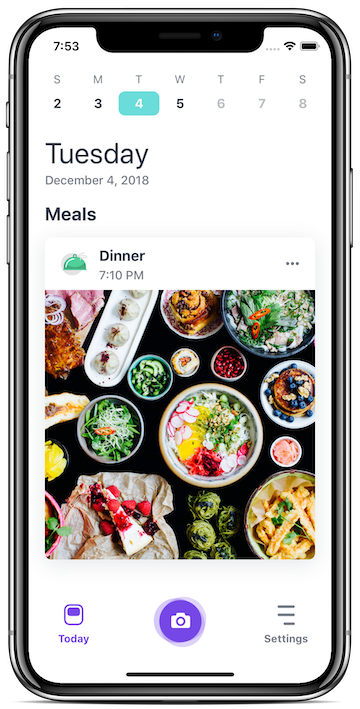
Your whole day, on one screen.
Meals, drinks and activity in the order they happened, each with its photo and its range. Meal slots you skipped stay as quiet empty rows - a prompt, not a telling-off.

The month
A month of your eating, as a grid of your own photos.
Every meal you photograph builds the calendar, and you can scroll back through any week as cards. The pattern is obvious long before a number says anything.

Nothing keeps score
Nothing here is keeping score.
Days you didn't log say "No entries" and that is the whole consequence. There is no streak to protect and nothing scolds you.

Free, forever. No setup, nothing to weigh.
- Never used to train AI. Never sold. No ads, no trackers.
- Sign in with Apple - no name, no email asked.
- Your diary, your photographs. Edit anything the app wrote; it leaves your changes alone.
What a photograph is worth
One picture, and the entry
is already written.
Back comes a description in plain words, the shape of the plate - mostly carbs at lunch, the vegetables returning as tags - an honest calorie range, and the drinks alongside it. That is enough to see how a week actually went, and enough for a nutritionist or a coach to give you real advice from your own log.
The entry writes itself
Description, tags, an honest range, the time it happened. It is done before the phone is back in your pocket, and every word of it stays yours to edit.
The pattern shows up
The same photographs stack into a month you can read at a glance: when you eat, what a normal day looks like, which evenings run long, what you drink without thinking.
One small change that sticks
Patterns are what you can actually act on. One thing at a time, chosen from your own record - the kind of change that is still there in March.
About the number: you get a range rather than a single figure - tight on a simple plate, wider on a mixed bowl you did not cook. The width is the app telling you how sure it is.
Week and Month in Review Pro
Something worth knowing,
every week.
At the end of a week or a month, MealSnap reads what you actually logged and writes back a few observations, plus one small thing you could try. Everything it says comes from your own entries - like a first and last meal drifting further apart.
Every drink you logged was water, tea or coffee.
Lunch moved around by more than three hours across the week. Anchoring it on a couple of days is the kind of small change that tends to stick.
First and last meals moved 12 minutes further apart.
Free, forever. No setup, nothing to weigh.
Built into iPhone
One tap from wherever you're eating.
The fewer taps between the plate and the diary, the more days you log.
Your meal slots, filling in as the day goes.
Camera to journal without unlocking anything.
Press and hold. The camera is already open.
A quick-photo control, one swipe away.
Ask out loud, or search your meals from the Home Screen.

Already took the picture? Send it over from Photos.

Tuesday 22 JulyNoodles with vegetables and tofu
Point the camera at dinner, find the last time you ate it - matched on your device, against your own photographs.
Free and Pro
The diary is free. Forever.
Free is a complete diary, not a trial: unlimited entries in all six types, up to nine photos on a meal, kept for as long as you keep them, with the descriptions in your own words.
Recognition and Stats are screenshots of the app. Review and Share are drawn for the web until their own captures exist.
Pro is where the diary starts working for you:
- Every photo recognized the moment you take it - no quota to keep an eye on.
- Full stats - trends across eating, drinking and activity, with goals if you want them.
- Week and Month in Review - what changed, what worked, one small thing to try.
- Reminders that close the loop - how full you were after a meal, and your review when it is ready.
- Share links and PDF export - the log, for whoever asked to see it.
| Feature | Free | Pro |
|---|---|---|
| The photo diary, all six entry types | Unlimited | Unlimited |
| Up to nine photos on a meal | Yes | Yes |
| Widgets, Siri, share sheet, Visual Intelligence | Yes | Yes |
| Photo recognition | 5 photos per rolling 7 days | Unlimited |
| Stats, trends and goals | Preview | Yes |
| Week and Month in Review | One-time: 5 weekly + 1 monthly | Yes |
| Fullness and period-review reminders | -Not included | Yes |
| Share links and PDF export | -Not included | Yes |
Worth knowing before you download: MealSnap answers in ranges rather than exact numbers, keeps to calories rather than a macro breakdown, and runs on iPhone. If what you want is precision to the gram, a weighing-based app will serve you better - more in the FAQ.
Free, forever. Pro's price shows in your own currency on the App Store.
Questions
The ones you're already asking.
Can a photo really estimate calories?
It estimates a range, and the width of that range is the honest signal of how sure it is. A tight range on a simple plate, a wider one on a mixed bowl. That is enough to spot a pattern, which is what a diary is for.
What if I want precision to the gram?
Then a weighing-based app is the better tool, and there are good ones. MealSnap is built for the log you actually keep for months: one photo per meal, a range that is honest about what a photograph can know, and enough signal to show you how you really eat.
What if it gets my meal wrong?
You fix it. The description, the range, the tags - everything it wrote stays editable, and what you change it leaves alone. You keep the control without doing the typing.
Is the free version actually free, or does it stop working?
It doesn't stop. The manual diary is free forever - unlimited entries, all six entry types, up to nine photos on a meal, and no cap on how much history you keep. Free also includes recognition for five photos per rolling seven days and a one-time preview of five weekly reviews and one monthly review. Pro makes recognition and reviews unlimited and adds the full stats, reminders, sharing and PDF export.
Which devices does it work on, and does it work offline?
iPhone, and your diary syncs across your devices. There is no Android version today. Log and photograph offline as usual - the calorie estimate needs a connection and fills itself in when you're back.
What happens to my photos?
They sync to your account so the diary works across your devices, and they're analyzed to produce your entry. That's it.
Are my photos used to train AI?
No. Your photos and data are never used to train AI models - not by us, not by our providers.
Is my data sold? Are there ads?
Your data is never sold. There are no ads and no tracking SDKs in the app.
Who can see my diary?
Nobody, unless you share it. A share link carries only a date range - never the entries themselves - and expires after seven days. A PDF you export goes wherever you send it.
Can I delete my account and my data?
Yes - from the app, or by contacting support. That removes your diary and associated account data, including stored photos. Sign in with Apple is the only sign-in method, so there is no separate MealSnap password.
Eat a little better. Think about it a lot less.
A few months in, the win isn't a streak. It's eating noticeably better, worrying less about not doing enough, and trusting yourself more around food. It starts with one photo.
Download on theApp StoreFree, forever. No setup, nothing to weigh.